



Zoho Mail, a web-based email client, is popular for its advanced search features, filters, eDiscovery operations, and more. But this email client is suitable for use in small, micro, or medium businesses only. As the businesses grow, there is a need for migration to a more secure platform suitable for large businesses, i.e., Office 365.
Many Zoho users feel that migrating from Zoho to Office 365 is a complex task. But it is quite easy. This write-up explains all those manual steps for Zoho Mail to Office 365 migration. However, understanding the reasons and differences between Zoho Mail and Office 365 is also necessary. Let’s begin!
Differences between Zoho Mail and Office 365
Zoho Mail and Office 365 are two different platforms that provide enterprise-grade email servers. Zoho Mail’s features are not limited to email communication, but it can be used as a collaborative service for a business. Let’s check a comparison of Zoho Mail with Office 365, which offers more services and storage.
| Zoho Mail | Microsoft 365 |
| The main objective of Zoho Mail is to create emails, send and receive emails, and monitor the mailbox of the user account. | Office 365 covers various services in its subscription. For the email task, there is Outlook. OneDrive provides ample cloud storage; the entire MS Office Suite is present here, and multiple additional applications work differently. |
| Major features are email monitoring, email archiving, data recovery, shared inboxes, routing, spam blocker, whitelisting, blacklisting, etc. | Major features are web development, social networking, online meetings, eDiscovery center, blogs, Wikis, business domain, file sharing, calendar, project-based mailboxes, voice calls, video calls, PC-to-PC calls, and internal and external file sharing. |
| Integration is reached through Zoho CRM, Projects, Docs, Creator, Asana, Zapier, HubSpot CRM, and Cliq. | Integration is scattered with various applications like SharePoint, OneNote, Outlook, Word, Excel, OneDrive, Skype for Business, Bookings, StaffHub, and Invoicing. |
| Customer service is provided through email, phone, and live chat. | Customer service is provided through email, phone, live chat, and tickets. |
Why Migrate Zoho Mail to Office 365?
Office 365 cloud platform has many advantages for its users over other email servers and email clients like Zoho Mail. Some of the common reasons to migrate Zoho Mail to Office 365 are:
- Office 365 is an enterprise-grade suite of applications from Microsoft that can be accessed remotely.
- Integrated with many applications for collaboration, like SharePoint, OneDrive, Yammer, Exchange Online, etc.
- Flexible subscriptions and services to fulfil the needs of all grade businesses and customers.
- Zoho feels difficulties in handling large files, while Office 365 offers more data storage capabilities.
Methods to Perform Zoho Mail to Office 365 Migration
Instead of direct methods, there are two indirect manual methods to import Zoho Mail to Office 365. Go through each and pick one at your convenience:
Method 1. Import Zoho Mail to Office 365 using Zoho Application
The Zoho application can’t directly help migrate to Office 365. You also need an Office 365 account configured in Outlook to do the same. Here are the steps to follow:
Stage 1. Export Zoho Emails to EML Files
- Log in to your Zoho account, click on the Settings icon, and tap on Import/Export Emails.
- Select the Export as EML option, choose the folder that you want to migrate to Office 365.
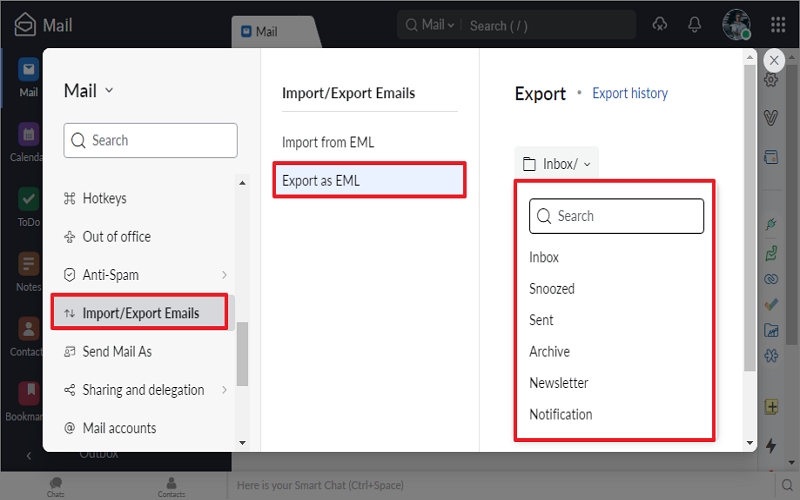
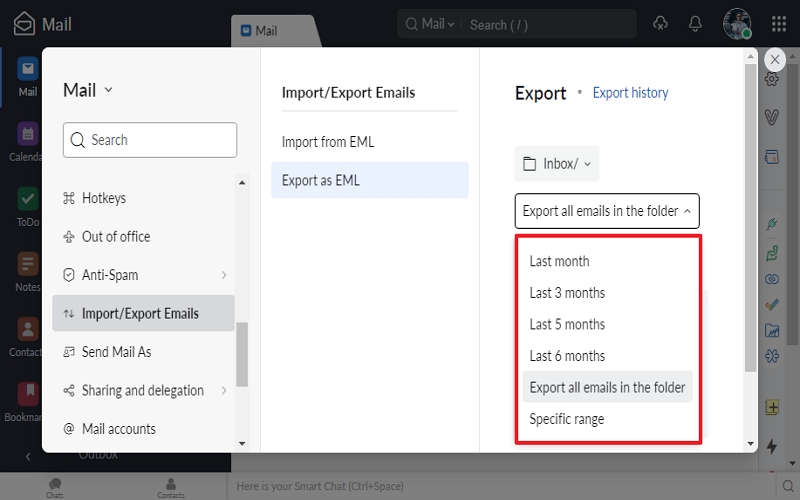
- Once you select the folders, specify a specific duration (date, month, etc.), include a subfolder, etc., accordingly.
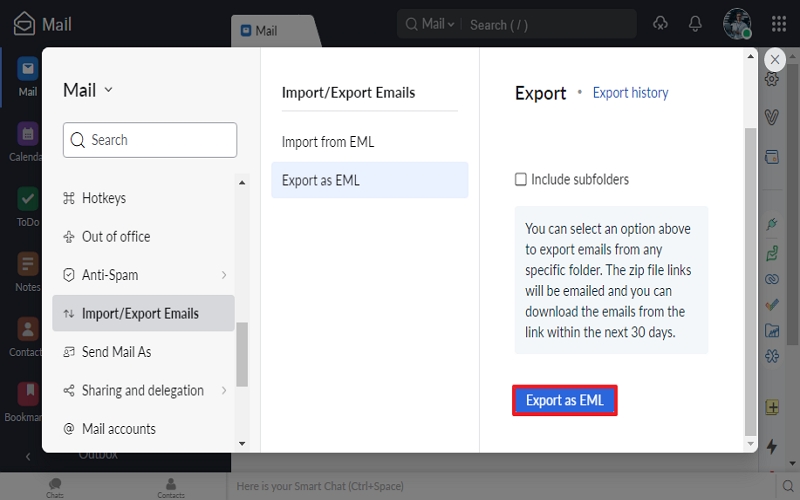
- Once selected, tap on the Export as EML button.
- You will get an email with a downloadable zip link on the same account. Open the link.
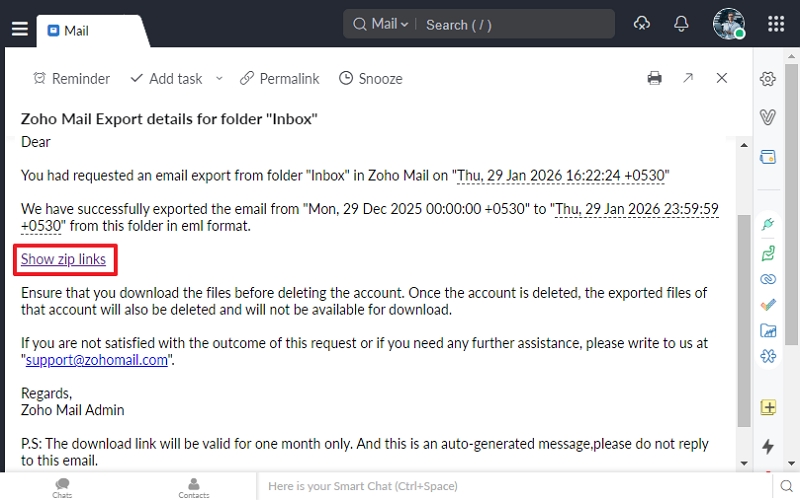
- Now, review the information and tap on Download. The selected ZohoMail folder will be downloaded.
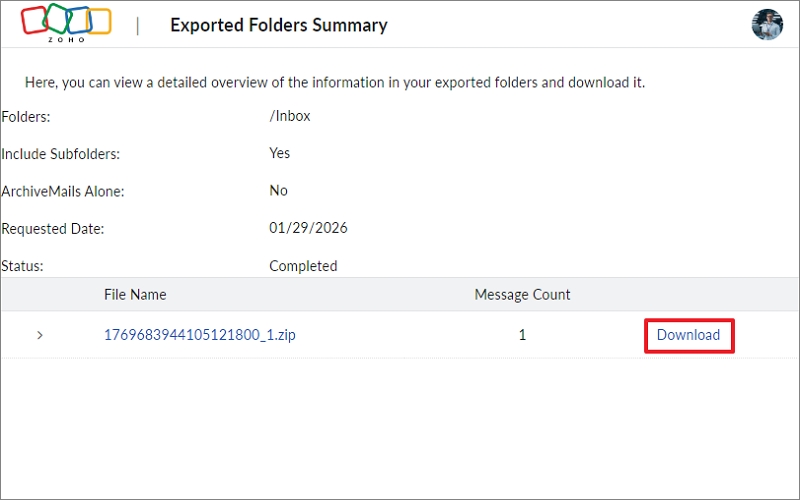
Note: Make sure to download the .zip file before deleting the account. Once you delete the account, the link will also be removed.
Stage 2. Import Zoho Mail EML file to Office 365
- Now open your Outlook and configure your Office 365 account. Unzip the downloaded file and drag and drop each EML file into Outlook.
By doing this, you can effectively migrate Zoho emails to Office 365.
Method 2. Import Zoho Mail to Office 365 using Outlook
Also, you can use the Outlook application for Zoho Mail to Office 365 migration. Here are the steps to follow:
Stage 1. Configure Zoho Account in Outlook
-
- Open Outlook, go to File, and tap on Add Account.
- Follow the steps to add an account in Outlook effectively.
- Once added successfully, tap on File, go to Open & Export. Click Import/Export.
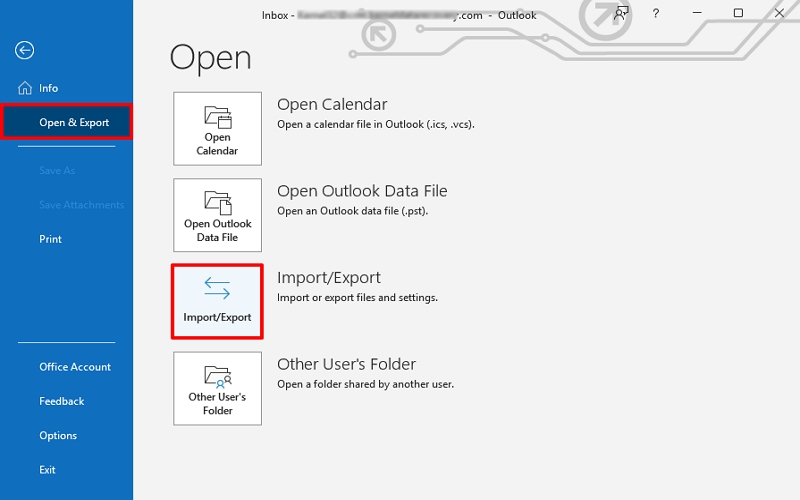
- Choose Export to a file, then click Next.
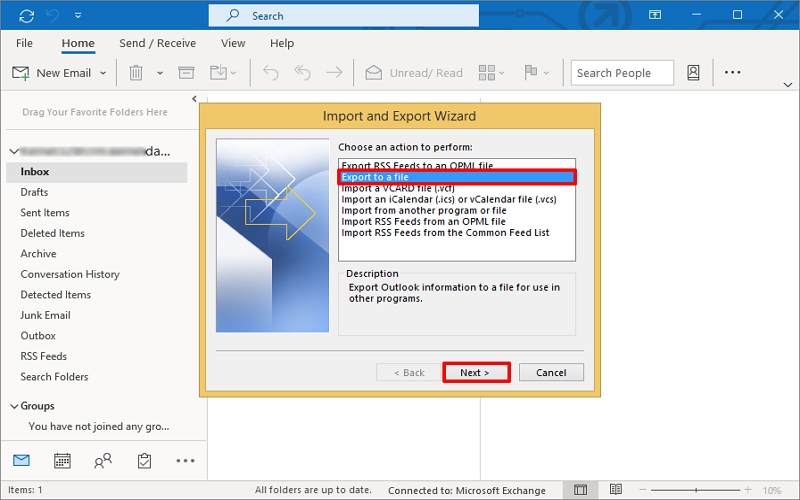
- Tap on Outlook Data File (.pst). Then click Next.
- Select the Zoho email account to export data locally. Click Next.
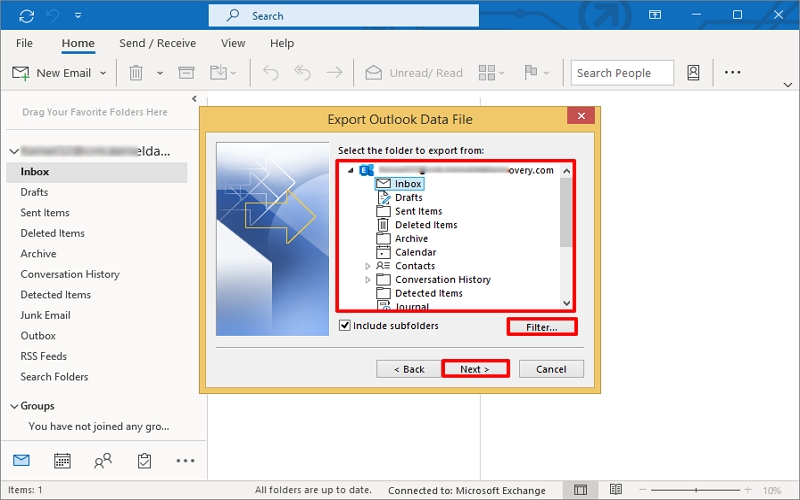
- Tap Browse and provide a location to save the output file. Click Finish. Input the password if asked.
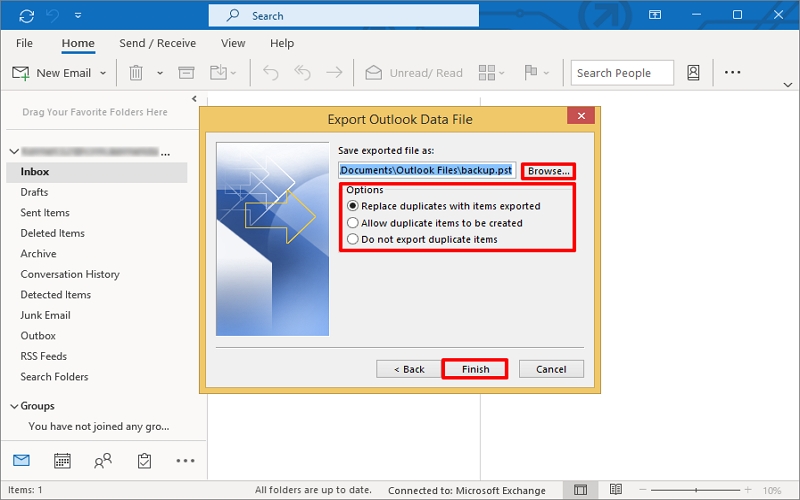
Note: You can also select specific folders to migrate to Office 365.
The entire Zoho Mail data will be saved in a PST file.
Stage 2. Transfer All Zoho Emails into Office 365
- After having Zoho mail data in a PST file, open your Outlook and configure your Office 365 account.
- Tap on File, go to Open & Export, and tap on Import/Export option.
- Select Import from another program or file and click Next.
- Choose Outlook Data File (.pst) and tap on Next.
- Browse to the PST file you want to migrate to Office 365, tap Next. Include folders and sub-folders accordingly, and click Finish.
The Zoho Mail emails are now in the Office 365 account.
Last Say
We hope you now have a better understanding of the differences between Zoho Mail and Office 365, along with the reasons for migration. The mentioned manual methods are workable to import Zoho Mail to Office 365, but require consecutive steps and setups. You can select the one at your convenience and perform Zoho to Office 365 migration yourself!
FAQs
Q: What is the best method to migrate Zoho Mail to Office 365?A: Migrating Zoho emails via Outlook can be considered as a viable solution because it migrates all Zoho data, like emails, contacts, calendar, etc., to Office 365. Besides, if you use the Zoho application to do the same, you may get only email data rather than contacts & calendars.
Q: What type of data is migrated to Office 365 using the Zoho application?A: With the Zoho application, you can only migrate EML files that contain email messages, including header metadata, body content, and attachments. To migrate calendar, contact, and task along with emails, export Zoho emails to PST files, and import them into Outlook.
Q: What are the limitations of manual methods to import Zoho Mail to Office 365?A: The manual method to import Zoho Mail to Office 365 comes with various limitations, like:
- Outlook should be installed and configured.
- Requires tech expertise to perform consecutive steps.
- Chance of errors and data loss.
- Unnecessary time consumption, etc.